Introduction
There's no battle to end all battles in this industry but there's no point either trying to reason with two deadly droids, armed with the latest technology. We have two of the season's hottest smartphones in combat mode and Android supremacy is the prize. The HTC One and the Sony xperia Z are cast in the same mold and stand at the pinnacle of Android revolution. Two big, scary droids and room for only one.

The two flagships have a lot in common - both run heavily customized JB on quad-core CPUs and pack huge 1080p
displays.
Here's a quick glance at what each phone has in its favor:
HTC One over Sony Xperia Z:
- 469ppi pixel density compared 441
- Beats Audio, BoomSound stereo speakers on the front, HDR microphone, HTC Zoe photo gallery
- More compact 137.4 x 68.2 over 139 x 71 mm
- Faster processor and GPU(1.7 GHz over 1.5GHz)
Sony Xperia Z over HTC One
- IP57 dust and water protection
- Bigger Screen
- Slimmer(7.9mm over 9.3mm)
- Micro SD card slot
Display comparison
There are two major things to consider when you rate a phone's screen quality: how well you can see what's on the display and how good it looks.
One thing that becomes immediately apparent at first glance is the superiority of the image seen on the HTC One. As we've seen before across numerous Xperia's dating all the way back to Sony Ericsson, the screens tend to have pretty poor viewing angles, but this time Sony didn't get the contrast right either.
The HTC One goes for a 4.7" screen, instead of 5", which is the current standard for 1080p screen phones. That makes its screen 12% smaller than the xperia z, while increasing the pixel density from 441ppi to 469ppi. The increase in sharpness is not noticeable as 441ppi is already beyond the limit of the human eye.
One factor that comes into the picture in regards to contrast ratio is screen reflectivity. The One's Gorilla Glass 2 screen is made of a more reflective material than what the Xperia Z uses, which means that regardless of its inferior contrast, the Sony screen does better outdoors.


Battery life

The HTC Butterfly features a 2300 mAh Lithium Polymer battery, while the Sony Xperia Z has a 2330 mAh battery of the Lithium Ion variety. While at first instinct it is tempting to assume that the higher capacity will result in longer life, it's not simply question of numbers, as tests will show.
A quick side note first. The HTC's One uses a Li-Po battery, which supposedly will last more charge cycles than the standard Li-Ion found in the Xperia Z. That's good to know, because putting a fresh battery in either device is no easy task and will probably require a visit to a service center.
According to tests by gsmarena, battery of Xperia Z has endurance of 48 hours if you do an hour of each of the videoplayback, web browsing and calling each day, which is quite good.
User interface
Although both manufacturers supply their smartphones with Android Jelly Bean 4.1 out of box their personalization approach is quite different. Still thanks to Jelly Bean's native Project Butter both phones are incredibly responsive, and they also get the other goodies of the 4.1 release - old widgets move out of the way when placing new ones and there's Google Now on board.
Here are the two UIs on video to get you started.
The lockscreen is one area where the two devices aren't too similar. The lockscreen on the Xperia Z uses a new cool animation and has two shortcuts for quick access to the camera (swipe to left) and to the dedicated music controls (swipe right). When the music player is active, the lockscreen will show the music controls by default, but you can hide them with a swipe if you want. You can also enable Face, Pattern, PIN or Password unlock, in ascending order of security.
There's no way of accessing other applications besides the music player and camera, unlike on HTC's Sense UI.

On HTC's OneThere's a clock, weather info and four (not five) positions for shortcuts. You can put a folder instead of an app shortcut if you need more than four apps accessible from the homescreen. The Lockscreen can show info on missed calls and received messages.

Both HTC and Sony has offer their customized versions of android. Sony offers timescape UI and HTC has their newest version of sense i.e. sense 5.
Overall two very different approaches to the same underlying OS. What it comes down to here is personal taste - what you prefer. Both interpretations have their strengths and weaknesses but the good news is they both provide solid user experience.
Keep in mind that both the lockscreen and the launcher (which is the homescreen + app drawer) can be replaced with a 3rd party app, so you're not tied to a particular combo if you buy the Xperia Z or the One.
To sum up, the lockscreen on the One is superior, the widgets on the Xperia Z are slightly more thought-out, the Sony also has a more useful notification area while Sense UI excels at personalizing the feel.
Camera:
The Sony Xperia Z is equipped with a 13 megapixel camera that can produce still shots with a maximum resolution of 4128 x 3096 pixels. However, if you use the default Superior auto mode, you get 12 MP 3920 x 2940 shots instead.
Naturally, the Sony Xperia Z camera offers all kinds of features, including face detection, smile shutter, geo-tagging, touch capture and HDR mode. There's also the home-baked quick launch mode, which lets you select what the camera shortcut on the lockscreen does.


The HTC One comes with a camera that's unique in the smartphone world. It's only the second mobile phone camera to be optically stabilized and it's the first to use a new design which involves photosites that are three times as big as those on a 12MP size. And since the sensor is equally sized to a 12MP sensor, it only gets to capture a third of the resolution. In HTC marketing talk these larger photosites are calls UltraPixels. Each pixel in the HTC One camera is twice the size of a pixel in the 808 and iPhone 5 cameras.

Bigger pixels mean lower noise levels and usually, betery dynamic range. Low-light performance is also helped by the Optical Image Stabilization (OIS) as we saw on the Nokia Lumia 920.The sensor used in the HTC One has a 1/3" diagonal with a 16:9 aspect ratio and it's mounted behind a 5-element lens with F/2.0 aperture. The sensor takes photos with 2688 x 1520 resolution, which amounts to 4MP.


The gallery on the Xperia Z is called Album and it's among the most fluid and visually appealing apps you could find on any smartphone platform. Images are organized into stacks of thumbnails and sorted by date. You can opt to show all of your albums in one place, and there are three tabs above the stacks - Pictures, Map and Online.
Pictures is the main tab and one of its features managed to impress us: you can pinch to resize the image thumbnails. The whole thing is super responsive and hundreds of thumbs fall in and out of differently sized grids with cool animation.
The Online tab displays pictures from Google Picasa and Facebook. You have options to tag, like and comment on Facebook photos.
In video playback, the Xperia Z did a very good job with almost any file type and video codec we threw at it, including DivX and XviD, even MKV. The only exception was AC3 audio support.A video editing app called Movie Studio is bundled too. It lets you edit video, images, and audio together using a variety of cool transitions.
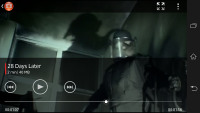
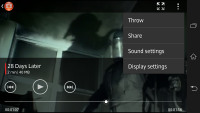
The Walkman music player we saw in Sony Xperia smartphones from the second half of 2012 is also on board. It offers the same cool interface as before, but this time it got even more sound enhancement options.
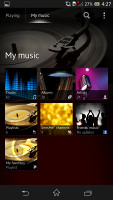
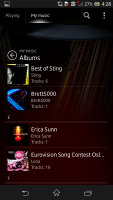
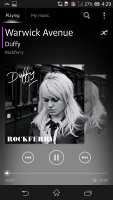
The music player is decent looking and snappy
The Now Playing screen offers the standard music controls, shortcuts to the library, "Infinity" key and the song cover art. The Infinity key lets you quickly look up a song on YouTube or browse for the lyrics, among others
HTC Zoe is more advanced than any other gallery on a phone and it works thanks to the dedicated ImageChip 2 that the One uses. One of those features is Events. Zoe can be used as a regular image gallery with photos stacked together according to their folders, but Events groups photos by when and where they were taken.
Each event has a 30 second highlight video, which is stitched together from those 3 second clips plus a slideshow, including some of the pics. You can remove clips and add new ones to the highlight video, add a video effect and also include a background music (the tracks are preset, though it is possible to add new ones to the list).
The Video player on the HTC One has a pretty simple interface, there isn't even a dedicated app, you just pick a video from the gallery. Anyway, you get a Play/Pause button and a slider to scrub through the video, a button to launch the camera and a small square with the current time and battery charge. Those automatically hide after a few seconds, of course.
The video player can use the Beats audio sound enhancement just like the music player, which is great for watching videos. The video player supports DLNA and you can use an MHL adaptor to plug the phone into a TV.

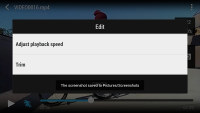
The video player
The HTC One comes with a custom music player, which is HTC Beats enabled, of course. It can organize your music library by Artist, Album, Songs, Playlists, Genres, Podcasts or Folders (we don't see this option very often). The phone will also easily stream songs over DLNA, you're not limited to the music library you have in the internal memory.
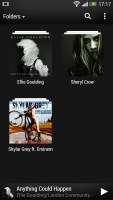

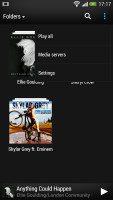
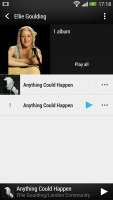
Browsing through the music library
The music player has some handy features out of the box. It can automatically look for and download Album art and artist photos (you can limit it to Wi-Fi connections only) and it can also search for lyrics.
Final words
On paper, the two devices offer so many of the same features that it requires a serious shootout like this one to really see what's what. In terms of the user interface, both run Android 4.1 Jelly Bean out of box, with a planned upgrade to 4.2 (Sony has historically been less consistent with its updates than HTC). While the Android version is the same, the individual software packages have strengths in different areas.
On the Xperia Z, you get a more functional UI and richer multimedia experience with Album, and the Gracenote-enhanced video player and the Walkman music player. On the other hand, we've found HTC's UI to be more customizable than the one provided by Sony, giving you the ability to make your phone cater to you individual needs more effectively. Finally, with connectivity features more or less on equal footing between the two, the overall Android experience comes down to personal preference.
From a hardware standpoint, the two devices again have different strengths. The 1080p display of the One is great,it gives good viewing angles, contrast, and nicely saturated colors. The Xperia Z can match the sharpness and the sunlight legibility of its competitor, but is still a distant second in terms of overall image quality.
When all's said and done, the current crop of Android flagships are a huge improvement from what we've seen in the past, even when compared to just a generation ago. If you're willing to look beyond their few flaws - the Xperia Z's less than stellar screen and the One's limited availability - the HTC and Sony 1080p offerings are both pinnacles of great technology. Here's hoping that what's next is even better.
images and information taken from gsmarena.com

No comments:
Post a Comment